

Taking part in an event
Updated · 1 min read
Events are workshops, classes or hackathons run by a manager. If you are a participant, you don't request an account: the organiser prepares one for you (or for your team), and it is handed to you when the event starts.
Before the event#
Make sure you can sign in to Sandbox Studio. If you were invited by email, accept the invitation before the event.
Accounts are prepared ahead of time but stay reserved until the event starts. You can't open them yet.
When the event starts#
You get an email saying you are participating in the event, and the account appears on your home page under Events I'm participating in, and on My AWS accounts under the event's name.
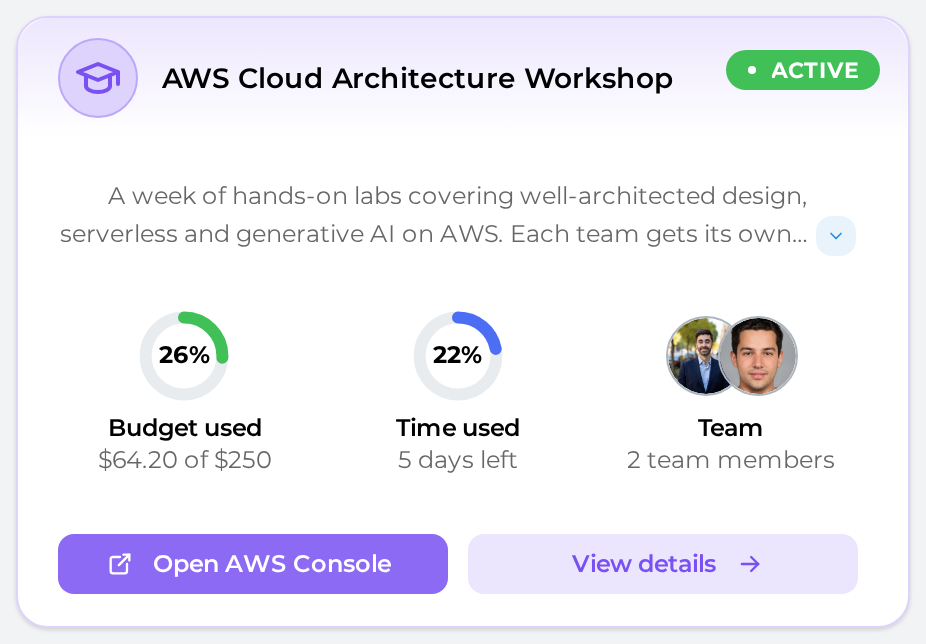
Choose Open AWS Console to start working. See Opening the AWS console.
Choose View details to see the account details, including the event it is Reserved for, your team and the time left.
You can also use the AWS CLI. See Using your account from the AWS CLI.
Working in a team#
If the organiser put you in a team, everyone in the team shares the same AWS account and the same budget. The card's Team shows who is in it. Only the organiser can change the team.
What you can't do in an event account#
The event decides how long the account lasts and how much can be spent. You can't add team members, terminate the account, or ask for an extension on the account itself. If you need more time or budget, talk to the event organiser.
When the event ends#
When the event ends, the organiser's settings decide what happens: accounts are usually terminated and everything in them is deleted. Copy anything you want to keep before the end. The organiser can also lock accounts, for example to review your work; see Why is my account locked?
Organisers: see Events in the Manager Guide.