

Cleanup settings
Updated · 2 min read
When a lease ends, Sandbox Studio removes everything from the AWS account so it can be reused. It uses the open-source tool AWS Nuke. Cleanup settings let you tune retries, keep certain resources, and run your own scripts before or after cleanup. In the side menu, choose Settings, then Cleanup Settings.
How cleanup works#
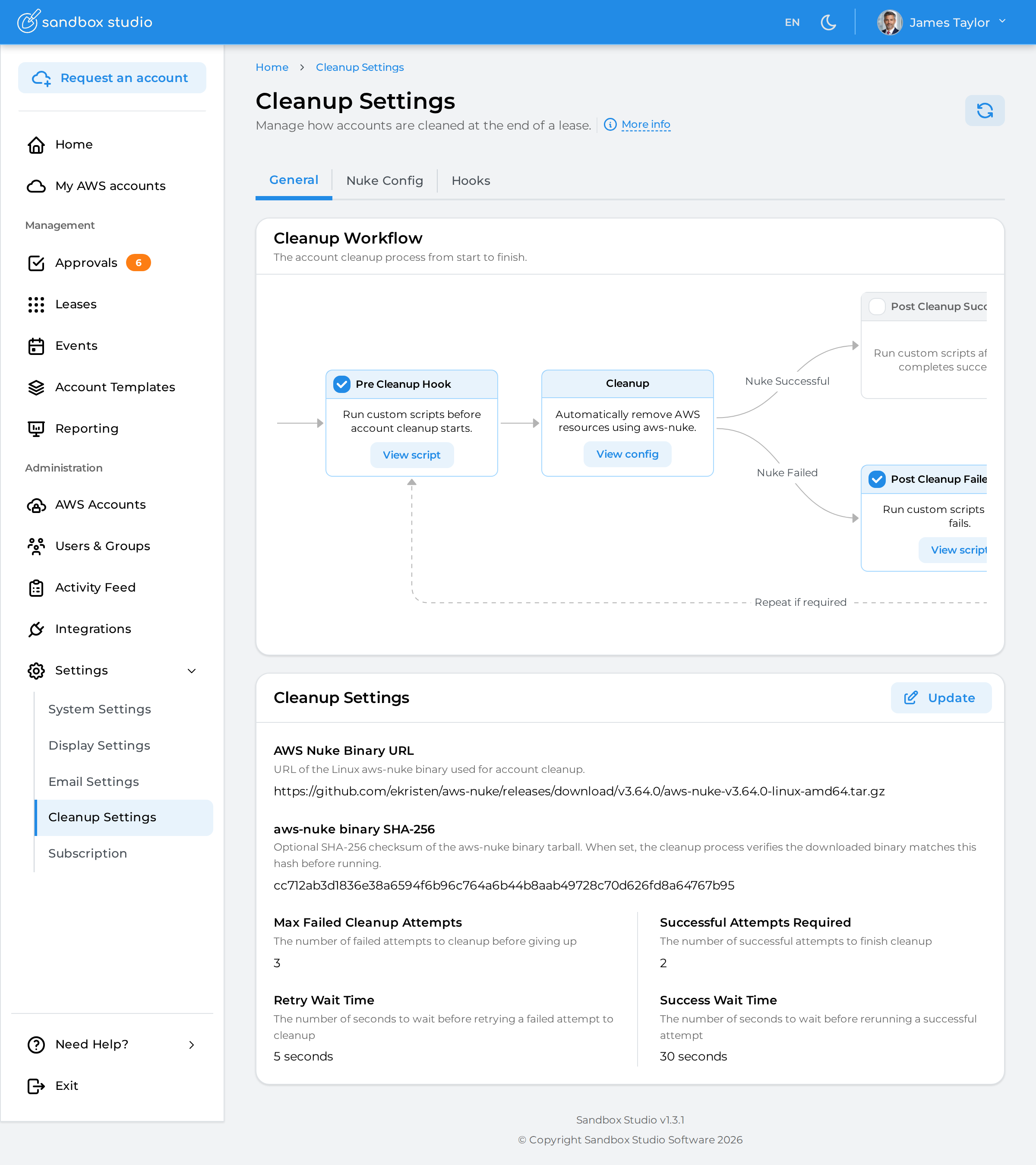
The Cleanup Workflow diagram on the General tab shows the steps:
Pre Cleanup Hook (optional): your script runs before cleanup starts.
Cleanup: AWS Nuke removes the account's resources. It is repeated until it succeeds the required number of times, or fails too many times.
Post Cleanup Success Hook or Post Cleanup Failed Hook (optional): your script runs after cleanup succeeds or fails.
If cleanup succeeds, the account goes back to the pool as Available. If it fails, the account is Quarantined and administrators are emailed. See Quarantined accounts and clean-up failures.
Cleanup Settings#
Choose Update on the Cleanup Settings card to change these:
Setting | What it does |
|---|---|
AWS Nuke Binary URL | Where to download AWS Nuke from. It must be the Linux AMD64 release. Change it to use a newer version from the AWS Nuke releases page. |
aws-nuke binary SHA-256 | Optional checksum of the download. When set, cleanup checks the downloaded file matches before running it. Update it whenever you change the URL. |
Max Failed Cleanup Attempts | How many failed attempts are allowed before the account is quarantined. |
Retry Wait Time | Seconds to wait before retrying after a failed attempt. |
Successful Attempts Required | How many successful runs are needed before the account counts as clean. Running more than once catches resources that only appear after others are deleted. |
Success Wait Time | Seconds to wait before running again after a successful attempt. |
Nuke Config#
The Nuke Config tab shows the AWS Nuke configuration in YAML. Choose Update to edit it, for example to add filters that keep resources AWS Nuke should not delete. See the AWS Nuke documentation for the format.
Hooks#
The Hooks tab lets you run your own shell scripts as part of cleanup, for example to remove resources AWS Nuke can't, or to alert your team when cleanup fails.
Pre-Cleanup Hook: runs before cleanup starts.
Post Cleanup Success Hook: runs after a successful cleanup.
Post Cleanup Failed Hook: runs after a failed cleanup.
For each hook, choose Update, turn on Hook Enabled, enter the Hook Script and save. The ID of the account being cleaned is available to the script as CLEANUP_ACCOUNT_ID. A failing hook is shown in the cleanup details of the account.