

Reporting
Updated · 2 min read
The Reporting page shows what the leases you manage have cost, grouped by account template, event or tag, so you can track spending and charge it back to teams or cost centres. Managers see costs for the templates and events they manage; administrators see everything.
Run a report#
Select Reporting in the side menu.
Choose the Date Range (by default, the start of this month until today) and the Cost View: Daily or Monthly.
Under Group By, choose Account Template, Events or Tags. For tags, choose which tags to group by under Select Tags.
Optionally, open Additional Filters to include only certain templates, events or tag values.
Select Generate Report. Select Reset to start again.
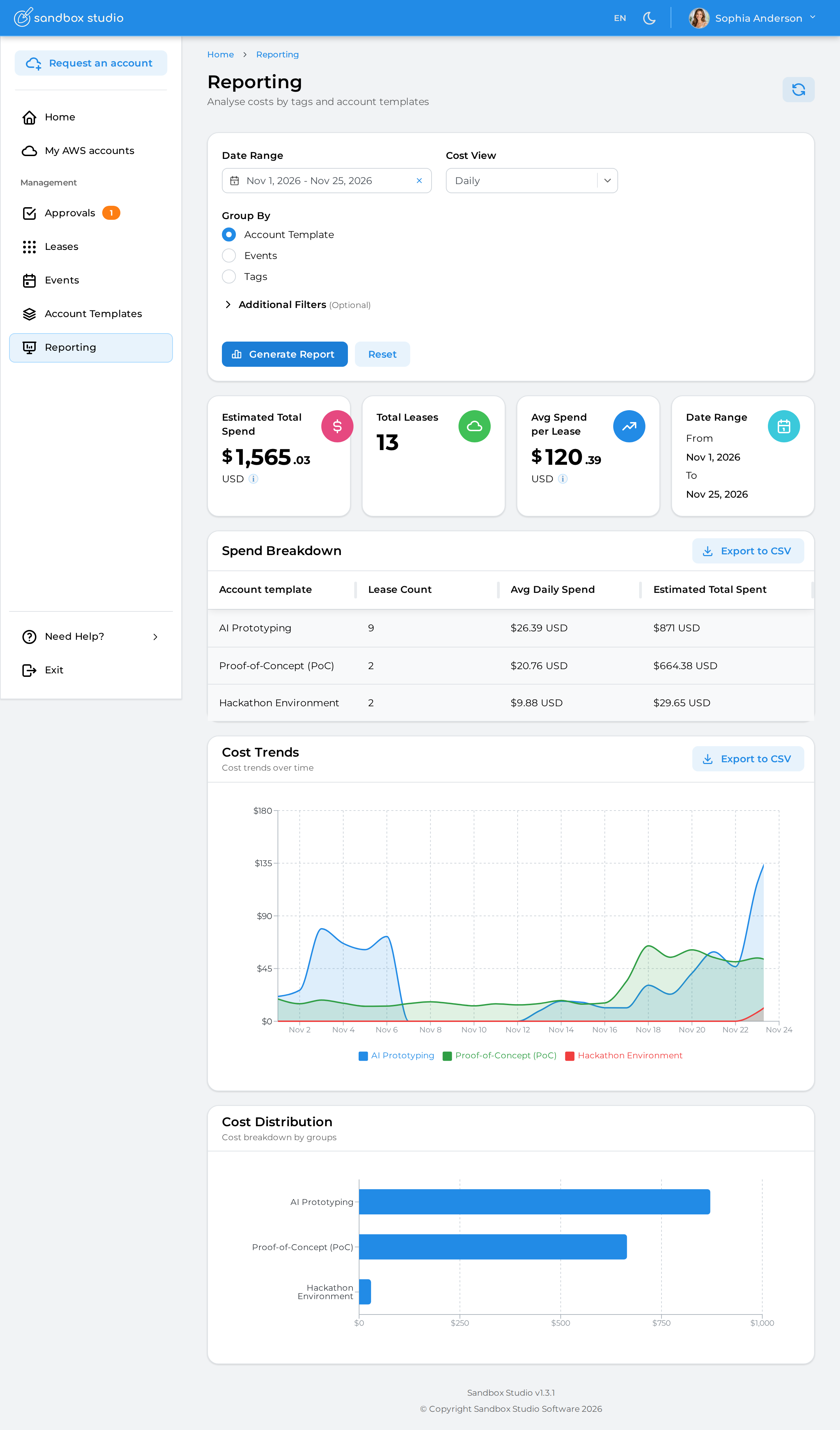
Reading the report#
Estimated Total Spend, Total Leases and Avg Spend per Lease for the period.
Spend Breakdown: a row per template, event or tag value with Lease Count, Avg Daily Spend and Estimated Total Spent.
Cost Trends: spend over time for each group.
Cost Distribution: how spend is split between groups.
Select Export to CSV on Spend Breakdown or Cost Trends to download the data for a spreadsheet or chargeback.
Costs elsewhere#
The Costs column on the Leases page shows what each lease has spent so far. Use Filter Leases to include terminated leases.
Each event's Budget card shows the event's total spend (see Event costs).
The Spend trend card on your home page shows the last 30 days.
How costs are calculated and how current they are#
Sandbox Studio gets each sandbox account's costs from AWS Cost Explorer about once an hour, from the start of the lease. Figures are unblended costs in US dollars.
AWS can take up to 24 hours to report some charges, so recent spend may be missing. That's why amounts are labelled Estimated. Hover over the information icon next to an amount for a reminder.
Costs are per AWS account and lease, so everything that ran in the account during the lease counts, including resources created by setup scripts.
The same figures are used to check budgets, so a lease may go slightly over its budget before its budget action happens.
For full billing detail across your organisation, an administrator with access to the AWS management account can use AWS Cost Explorer directly. See Analysing your costs with AWS Cost Explorer.