

Activity feed
Updated · 2 min read
The activity feed is a record of important activity across Sandbox Studio: who signed in, who requested, approved or opened an account, who changed a role or a setting, and what the system did automatically. Use it to answer "who did what, and when?". Only administrators can see the whole feed.
Open the activity feed#
Choose Activity Feed in the Administration section of the side menu.
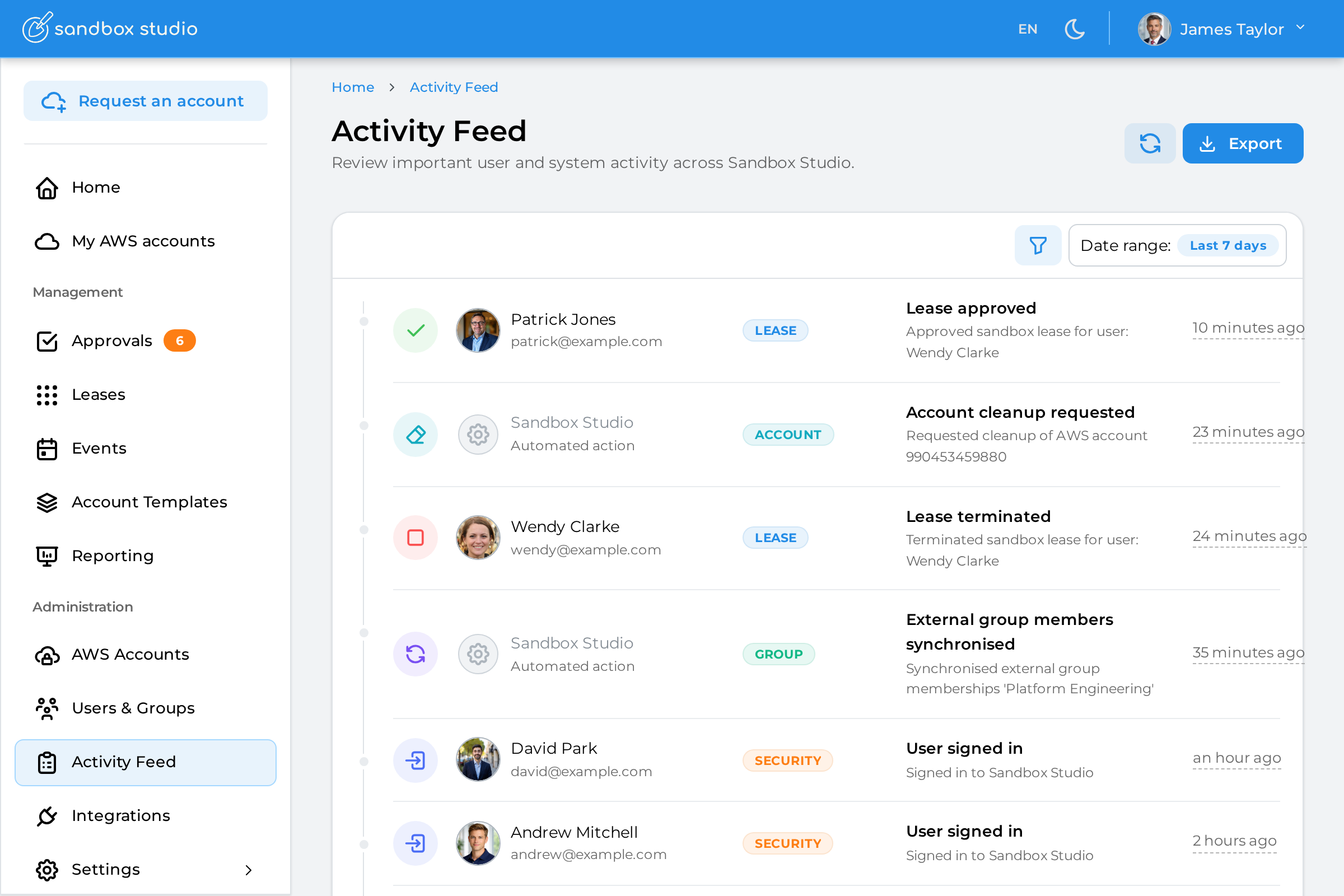
Each entry shows:
Who: the person who did it, or Sandbox Studio, Automated action for things the system did by itself, such as cleaning up an account.
Category: for example Lease, Account, Event, Group, Security or System.
What: a short description, such as Lease approved or User role updated, and the person, account or resource it relates to.
When: hover over the time to see the exact date and time.
Choose Show details on an entry to see more, and Copy details to copy them, for example into a support ticket.
Filter and export#
Choose the filter button to show only certain categories, such as User, Security or Account.
Choose Date range to switch between Last 24 hours, Last 7 days (the default), Last 30 days, Last 90 days and All time.
Choose Load more at the bottom to see older entries.
Choose Export to download everything that matches your filters as a CSV file.
To see one person's activity, open their page from Users & Groups and choose the Activity tab. Every user can also see their own recent activity on their profile page.
What's recorded#
Area | Examples |
|---|---|
Sign-in and security | User signed in, authenticator or SMS authentication enabled, two-factor authentication disabled, API client created, updated or deleted |
Users and groups | User invited, invitation resent or revoked, user role updated, group created, updated or deleted, members added or removed, external group members synchronised |
AWS accounts | Account accessed, account accessed by administrator, account imported or ejected, cleanup requested, successful or failed, account quarantined, drift detected or resolved |
Leases | Requested, approved, denied, withdrawn, shared, owner changed, suspended, resumed, terminated, budget and duration thresholds reached, setup succeeded or failed |
Events and templates | Event created, started, stopped or terminated, participants added, template created, updated or deleted, managers updated |
Settings and licence | Authentication, global, email, SMTP and cleanup settings updated, terms of service updated, test email sent, subscription updated, lease or drift monitoring started, licence limit exceeded |
Secrets, such as passwords, invitation links and API client secrets, are never recorded.
How long activity is kept#
Sandbox Studio doesn't delete activity automatically. Entries are kept in the Sandbox Studio database for as long as the installation exists, and are included in database backups. See Backing up Sandbox Studio.