Skip to content
Sandbox StudioSandbox Studio
Website
Sandbox StudioSandbox Studio
Administrator Guide
  • Home Page
  • AWS Accounts
  • Settings
    • System Settings
    • Display Settings
    • Email Settings
    • Cleaner Settings
    • Subscription
  • Monitoring the solution
  • Troubleshooting & Support
    • Investigating accounts in Quarantine state
    • Resolving clean-up failures
    • Clean-up failure: Elasticache default.iam-user / default.iam-user-group
  • Backup of the solution
  • Monitor for updates
  • UI Customisation
    • Display user profile pictures
    • Change default language
    • Change header logo
    • Change theme colour
Installation Guide
  • Solution overview
    • Overview
    • Core Capabilities
    • Concepts and definitions
  • Architecture overview
    • Security & Compliance
    • Roles deployed by the solution
    • Secrets & Encryption keys
    • Data stored (and where)
  • Plan your deployment
    • Prerequisite Skills and Specialised Knowledge
    • Installation Prerequisites
    • Choosing your region(s)
    • Understand running costs
    • Creating sandbox accounts
    • External identity provider setup (Optional)
  • Deploy the Solution
    • Running the Installation Wizard
    • Update Sandbox Studio
    • Non-interactive installation (Configuration file)
  • Deploy the Solution Manually
    • Before you start...
    • Overview of what you'll do
    • Step 1: Deploy the AccountPool stack
    • Step 2: Deploy the IDC stack
    • Step 3: Deploy the Network stack
    • Step 4: Deploy the Data stack
    • Step 5: Deploy the Compute stack
    • Step 6: Deploy the API stack
  • Post-deployment configuration tasks
    • Create an IAM Identity Center application
    • Add initial users
    • Update AWS AppConfig
    • Update AWS Secrets Manager
    • Logging into the web UI
    • Setup a custom domain (Optional)
  • Manage your subscription
    • Free Tier and Upgrading
    • End User Licence Agreement (EULA)
  • Uninstall Sandbox Studio
Manager Guide
  • Leases
    • What are leases?
    • Listing leases
    • Filtering leases
    • Lease details
    • Approving & rejecting leases
    • Locking & unlocking an account
    • Extend budget or duration
  • Events
    • What are events?
    • Event creation - Overview
    • Event creation - Basic details
    • Event creation - Account template
    • Event creation - Managers
    • Event creation - Schedule
    • Event creation - Participants
    • Event creation - Review
    • Terminate events
    • Start events and provision accounts
  • Account Templates
    • What are account templates?
    • Account template creation - Overview
    • Account template creation - Launch Settings
    • Account template creation - Review
    • Update Account templates
    • Duplicate Account Templates
  • Reporting
  • Reference : Lease States
User Guide
  • What is Sandbox Studio?
  • My AWS accounts
  • Terminate my account
  • Share my account
  • Accessing environment details
  • Account Setup Failed
  • Using your account from the AWS CLI
Website
Administrator Guide
  • Home Page
  • AWS Accounts
  • Settings
    • System Settings
    • Display Settings
    • Email Settings
    • Cleaner Settings
    • Subscription
  • Monitoring the solution
  • Troubleshooting & Support
    • Investigating accounts in Quarantine state
    • Resolving clean-up failures
    • Clean-up failure: Elasticache default.iam-user / default.iam-user-group
  • Backup of the solution
  • Monitor for updates
  • UI Customisation
    • Display user profile pictures
    • Change default language
    • Change header logo
    • Change theme colour
Installation Guide
  • Solution overview
    • Overview
    • Core Capabilities
    • Concepts and definitions
  • Architecture overview
    • Security & Compliance
    • Roles deployed by the solution
    • Secrets & Encryption keys
    • Data stored (and where)
  • Plan your deployment
    • Prerequisite Skills and Specialised Knowledge
    • Installation Prerequisites
    • Choosing your region(s)
    • Understand running costs
    • Creating sandbox accounts
    • External identity provider setup (Optional)
  • Deploy the Solution
    • Running the Installation Wizard
    • Update Sandbox Studio
    • Non-interactive installation (Configuration file)
  • Deploy the Solution Manually
    • Before you start...
    • Overview of what you'll do
    • Step 1: Deploy the AccountPool stack
    • Step 2: Deploy the IDC stack
    • Step 3: Deploy the Network stack
    • Step 4: Deploy the Data stack
    • Step 5: Deploy the Compute stack
    • Step 6: Deploy the API stack
  • Post-deployment configuration tasks
    • Create an IAM Identity Center application
    • Add initial users
    • Update AWS AppConfig
    • Update AWS Secrets Manager
    • Logging into the web UI
    • Setup a custom domain (Optional)
  • Manage your subscription
    • Free Tier and Upgrading
    • End User Licence Agreement (EULA)
  • Uninstall Sandbox Studio
Manager Guide
  • Leases
    • What are leases?
    • Listing leases
    • Filtering leases
    • Lease details
    • Approving & rejecting leases
    • Locking & unlocking an account
    • Extend budget or duration
  • Events
    • What are events?
    • Event creation - Overview
    • Event creation - Basic details
    • Event creation - Account template
    • Event creation - Managers
    • Event creation - Schedule
    • Event creation - Participants
    • Event creation - Review
    • Terminate events
    • Start events and provision accounts
  • Account Templates
    • What are account templates?
    • Account template creation - Overview
    • Account template creation - Launch Settings
    • Account template creation - Review
    • Update Account templates
    • Duplicate Account Templates
  • Reporting
  • Reference : Lease States
User Guide
  • What is Sandbox Studio?
  • My AWS accounts
  • Terminate my account
  • Share my account
  • Accessing environment details
  • Account Setup Failed
  • Using your account from the AWS CLI
  1. Manager Guide
  2. Events

Event creation - Overview

Updated November 7, 2026 · 1 min read

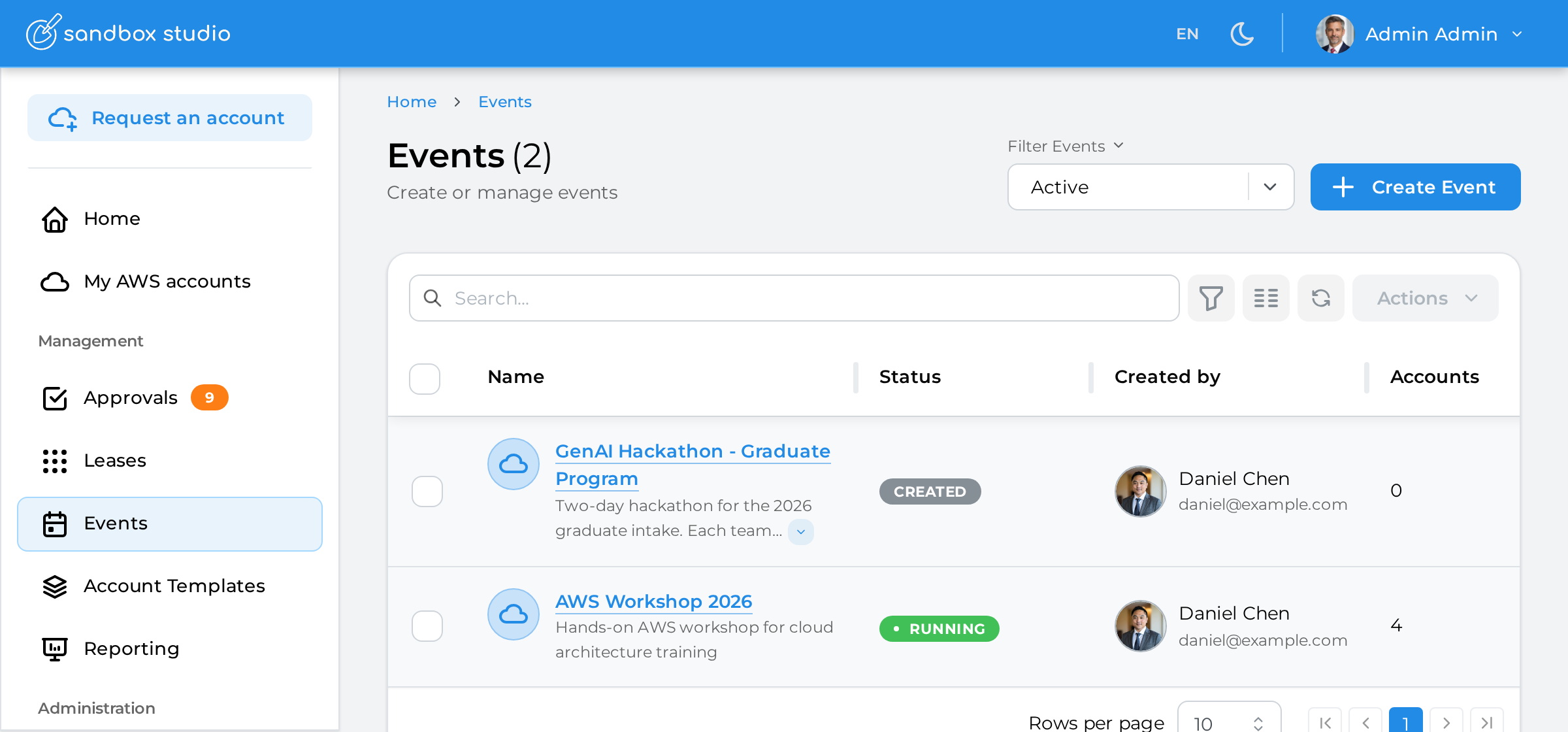
To create a new account template:

  1. Click on "Events" on the left menu

  2. Click on "Create Event"


Creating an event is a 6-step process listed as follows:

  1. Basic details

  2. Account template

  3. Schedule

  4. Participants

  5. Managers

  6. Review

PreviousWhat are events?NextEvent creation - Basic details
Sandbox StudioSandbox Studio

Privacy | Support | support@sandboxstudiosoftware.com | GitHub

© 2026 Sandbox Studio Software Ltd. All rights reserved.

↑↓ to move · Enter to open · / to search from anywhere