# Listing leases

As a Manager, you can see and manage leases. To have management access to leases, you need to:

- Have **Manager access** in Sandbox Studio
- Be granted **management permissions** on the account template that the leases use

<p class="callout info">Note: Administrators have full permissions and can see all leases.</p>

To access leases, click on the "Leases" link in the left menu:

[![image.png](https://docs.sandboxstudiosoftware.com/uploads/images/gallery/2026-04/scaled-1680-/8bBimage.png)](https://docs.sandboxstudiosoftware.com/uploads/images/gallery/2026-04/8bBimage.png)

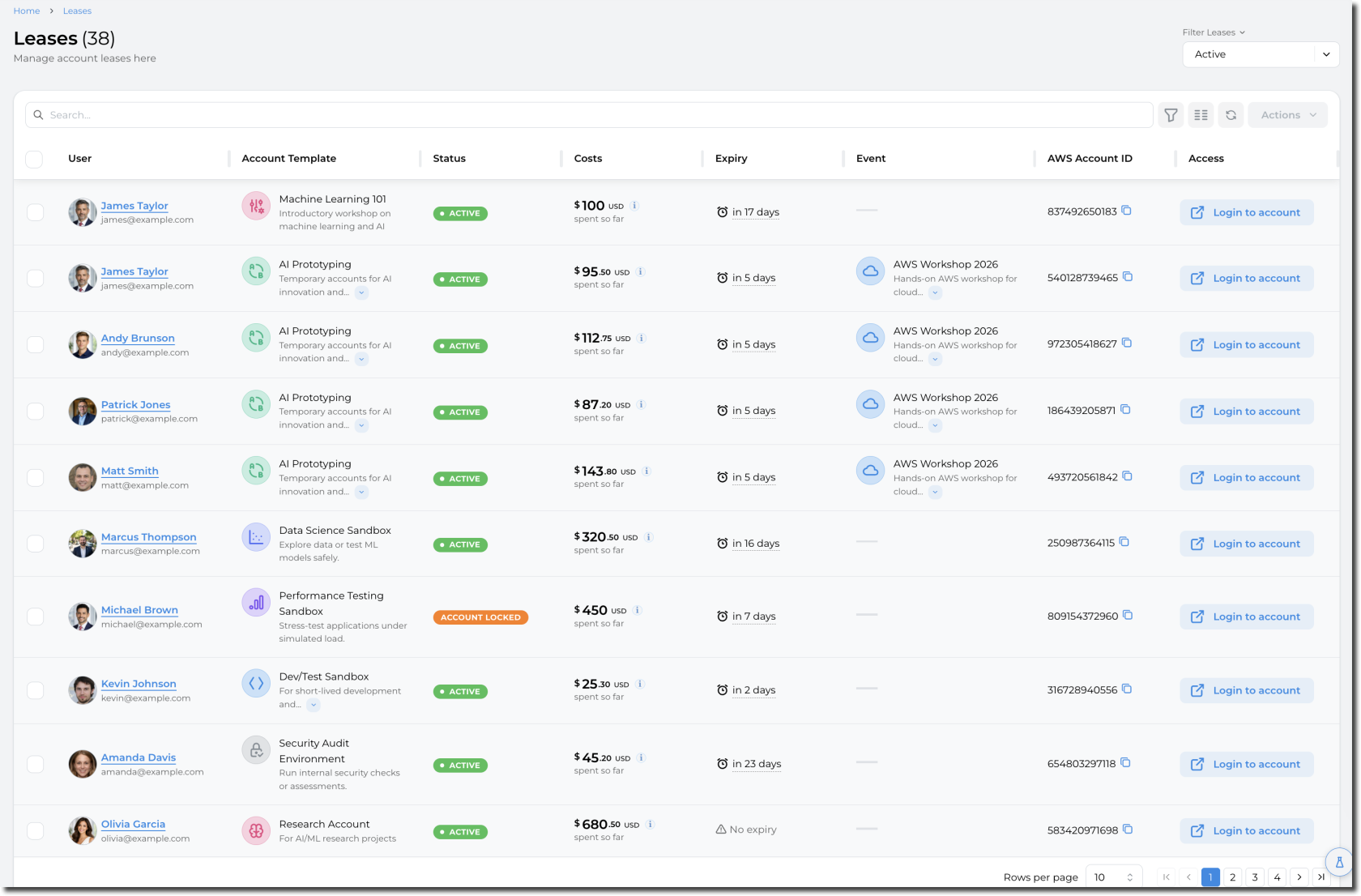
This displays the list of leases that are currently being used (Status Active, Locked, or Pending Approval):

[![image.png](https://docs.sandboxstudiosoftware.com/uploads/images/gallery/2026-04/scaled-1680-/DyRimage.png)](https://docs.sandboxstudiosoftware.com/uploads/images/gallery/2026-04/DyRimage.png)
<div _ngcontent-ng-c2400163040="" class="markdown markdown-main-panel enable-updated-hr-color" dir="ltr" id="bkmrk--3"></div>