Architecture overview
The architecture of Sandbox Studio brings together multiple AWS services to deliver secure, temporary sandbox environments. At a high level, the solution uses a combination of managed services that each play a specific role — from provisioning accounts and handling authentication, to monitoring usage and cleaning up resources. These services work together through event-driven automation and serverless functions to ensure scale, reliability, and efficiency. Security and compliance are built into the design, with controls such as least-privilege access, encryption, service control policies (SCPs), and network isolation.
The following sections provide more detail on the overall solution design, the AWS services used, and the security model that underpins it.
- Solution Architecture
- AWS services in this solution
- Security & Compliance
- Roles deployed by the solution
- Secrets & Encryption keys
- Data stored (and where)
Solution Architecture
Sandbox Studio solution is built entirely on AWS services, with each component playing a specific role in delivering, securing, and managing sandbox environments. The architecture uses managed services to ensure scalability, security, and automation.
The diagram below shows the main components and how they interact. Follow the numbered sections in this guide to understand the purpose and function of each component in the solution.
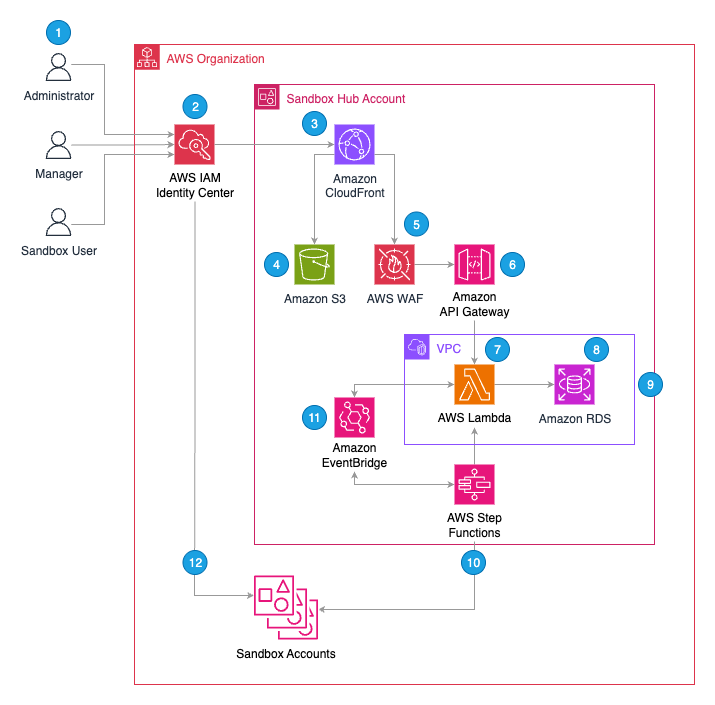
1. User Roles & Responsibilities
Sandbox Studio supports three types of users, each with distinct responsibilities:
1. Administrators
Responsible for configuring and maintaining Sandbox Studio for their organisation.
Key responsibilities include:
-
Setting global policies such as maximum budget thresholds and cleanup rules.
-
Managing AWS integration, including permissions and guardrails.
-
Provisioning new sandbox accounts when needed.
-
Overseeing security and governance settings.
2. Managers
Oversee day-to-day sandbox usage within a team or department.
Key responsibilities include:
-
Approving or rejecting sandbox requests.
-
Assigning account templates to users.
-
Tracking spending and activity for accounts under their supervision.
3. Sandbox Users
Request and use sandbox accounts for development, testing, training, or experimentation.
They must operate within:
-
Guardrails
-
Permissions
-
Budget limits
2. Authentication and Access
-
All users access Sandbox Studio via a SAML 2.0 application using AWS IAM Identity Center.
-
IAM Identity Center can:
-
Use its own internal user store, or
-
Integrate with external identity providers (e.g., Okta, Microsoft Entra ID).
-
-
Most organisations with an existing AWS Organisation use an external provider for centralised identity management.
3. Application Entry Point
-
The web UI is accessed through Amazon CloudFront, which serves as a single entry point for:
-
The static web UI (hosted in Amazon S3).
-
API endpoints (via Amazon API Gateway).
-
4. UI Hosting
-
Amazon S3 hosts static assets such as HTML, CSS, and JavaScript files.
5. API Protection
-
AWS WAF protects API Gateway from common exploits, bots, and resource abuse.
6. API Gateway
-
The web UI communicates with Amazon API Gateway REST APIs to:
-
Fetch data
-
Update configuration and status information
-
-
AWS Lambda functions authorize requests using role-based access control based on IAM Identity Center groups.
7. Backend
AWS Lambda is used throughout Sandbox Studio to run backend logic, including:
8. Database
-
AWS Lambda functions read and write configuration and status data to a PostgreSQL database deployed using Amazon Relational Database Service (RDS).
-
The RDS database runs inside a VPC in the sandbox hub account.
9. Networking
The Amazon Virtual Private Cloud (VPC) hosts the PostgreSQL RDS database used by Sandbox Studio.
Key characteristics include:
-
Private subnets for hosting the RDS database securely.
-
VPC-enabled Lambda functions to allow direct database access.
-
Network isolation from other AWS resources to protect sensitive configuration and status data.
10. Account Lifecycle Management
- AWS Step Functions coordinate the lifecycle of sandbox accounts, including:
- Onboarding new accounts
- Terminating leases
- Cleaning up accounts for reuse
- Step Functions move accounts between Organizational Units (OUs) based on their current status.
- Onboarding or termination events trigger dedicated cleanup workflows. These workflows can invoke other AWS services, such as AWS CodeBuild, to run resource deletion tools like AWS Nuke, ensuring all user-created resources are removed before the account is returned to the available pool.
11. Event-Driven Automation
-
Amazon EventBridge routes lifecycle events such as
-
Lease budget breaches
-
Lease duration breaches
-
-
When triggered, these events can:
-
Send email notifications
-
Invoke Lambda functions and Step Functions to manage lifecycle actions
-
12. Sandbox Account Access
-
Users can access assigned AWS sandbox accounts via:
-
AWS IAM Identity Center Access Portal (console access)
-
Programmatic access using generated credentials
-
-
The Sandbox Studio web UI provides SSO links for direct AWS console login.
13. Licensing Server
-
Sandbox Studio regularly queries the Sandbox Studio Software Licensing Service to confirm the customer's entitlement. That service will also query the AWS Marketplace.
Note: a number of other supporting AWS services are used by Sandbox Studio. Please see AWS services in this solution for the full list.
AWS services in this solution
Sandbox Studio uses a combination of AWS managed services to securely deliver, manage, and clean up sandbox environments. The table below describes the core AWS services used in the solution.
| AWS Service | Description |
|---|---|
| Amazon CloudFront | Acts as the entry point into the application. It fronts both the static website (hosted in Amazon S3) and the API Gateway, ensuring secure and efficient content delivery. |
| AWS IAM Identity Center | Manages all user access to the solution. Every user has an account in IAM Identity Center, where access permissions and group memberships are defined. |
| AWS AppConfig | Stores global limits and application settings, allowing configuration updates without code changes. Used across multiple parts of the solution. |
| AWS Organisations | Hosts all organisational units (OUs) used to manage sandbox accounts. The solution places accounts in different OUs depending on their state in the sandbox lifecycle. |
| Amazon RDS | Provides a PostgreSQL database for storing structured data such as account templates and lease records. |
| AWS Secrets Manager | Securely stores private keys for authentication and database credentials used by the application. |
| AWS Lambda | Runs all backend compute for the application using a serverless architecture, avoiding the need for containers or virtual machines. |
| AWS CodeBuild | Runs pre-launch tasks (such as deploying resources into new accounts) and cleanup tasks (such as deleting resources after a sandbox lease expires). |
| Amazon S3 | Hosts the main static website for the application. |
| AWS Key Management Service (AWS KMS) | Uses customer-managed keys to encrypt various elements of the solution. |
| Amazon Simple Queue Service (Amazon SQS) | Handles asynchronous events such as bulk account setup or cleanup operations. |
| AWS Systems Manager | Uses AWS Systems Manager Parameter Store to store installation-time configuration variables that need to be shared across different CloudFormation stacks in the solution. |
| Amazon CloudWatch | Captures all application logs and system metrics, allowing administrators to monitor system health and troubleshoot issues. |
Security & Compliance
This page provides an overview of the security model used by Sandbox Studio. It explains how the solution is deployed, the controls in place, and how it aligns with enterprise security, compliance, and governance requirements.
Deployment Model
-
Customer-owned deployment – Sandbox Studio is deployed into your own AWS Organisation or Landing Zone. It is not SaaS.
-
Full control – You retain complete ownership of AWS accounts, configurations, and network boundaries.
-
Account isolation – Sandbox accounts are provisioned into dedicated Organisational Units (OUs) with Service Control Policies (SCPs) applied to enforce guardrails.
Data Protection
-
No production data ingestion – Sandbox Studio does not ingest, store, or process production workloads unless specifically configured to do so.
-
Local metadata – Configuration data, logs, and monitoring outputs remain within your AWS accounts unless explicitly shared.
-
Encryption standards:
-
In transit – All communication uses TLS 1.2 or higher.
-
At rest – All persistent data is encrypted with AWS KMS (customer-managed where appropriate).
-
-
Credential handling – No AWS credentials are stored outside your environment.
Identity & Access Management
IAM Roles
-
Multiple IAM roles are deployed to run Sandbox Studio and discover resources within AWS accounts.
-
Roles follow least privilege principles, granting only the minimal permissions required for each function.
-
Separation of duties is enforced across deployment, lifecycle automation, and monitoring components.
IAM Identity Center & SAML
-
AWS IAM Identity Center (formerly AWS SSO) provides centralised authentication.
-
Sandbox Studio integrates with SAML 2.0 identity providers (e.g., Okta, Microsoft Entra ID) for seamless single sign-on.
-
Users sign into the Sandbox Studio web UI with existing corporate credentials, eliminating the need for local passwords.
Role-based Access
-
Access levels are defined by permission sets:
-
End users – Request and operate sandbox accounts.
-
Managers – Approve requests, define templates, and oversee usage.
-
Administrators – Configure global settings, guardrails, and integrations.
-
-
SCP enforcement prevents privilege escalation, service misuse, or bypassing of governance controls.
Network Security
Sandbox Studio backend services run inside a dedicated VPC with a layered subnet model to enforce isolation.
-
Three subnet tiers:
-
Public subnet – Only for CloudFront distribution and API Gateway.
-
Private application subnets – Run AWS Lambda functions with controlled outbound-only egress for required API calls.
-
Private database subnets – Host PostgreSQL RDS, with no inbound or outbound internet access.
-
-
No direct internet exposure – Backend compute and storage remain fully private.
-
AWS WAF protection – A regional WAF ACL secures API Gateway endpoints using four AWS managed rule groups and two custom rules.
-
Separation of duties – Network boundaries ensure web entry points, compute, and data tiers are isolated.
Core Security Services
AWS Key Management Service (KMS)
-
Sandbox Studio creates four Customer Managed Keys (CMKs), one per stack (AccountPool, IDC, Data, Compute).
-
Each CMK encrypts AWS resources such as:
-
CloudWatch Logs
-
Amazon SQS queues
-
EventBridge event buses
-
AWS Secrets Manager secrets
-
AWS CodeBuild projects
-
Amazon RDS database
-
-
CMKs follow separation of concerns, limiting key scope and permissions per stack.
AWS WAF
-
Web Application Firewall (WAF) protects API Gateway endpoints.
-
Rules include managed protections (e.g., SQLi, XSS, bot control) and two custom allowlists.
-
Default behaviour blocks any request failing rule evaluation.
Amazon CloudFront
-
Serves the Sandbox Studio web UI hosted in Amazon S3.
-
Configured with TLS 1.2+ for all sessions.
-
Adds HTTP security headers to viewer responses.
-
For stricter TLS enforcement, a custom certificate can be applied to require TLS 1.2 or TLS 1.3.
Amazon RDS
-
All user data stored in Amazon RDS (Relational Database Service) is encrypted at rest with AWS KMS CMKs.
AWS Lambda
-
All backend logic runs on serverless Lambda functions.
-
Each function uses the most recent stable runtime.
-
No secrets are logged, and IAM roles are isolated per function.
-
Functions operate with least-privilege permissions and scoped network access.
Lifecycle Management
-
Pre-configured templates – Sandboxes are provisioned with security guardrails and governance baked in.
-
Automated teardown – On expiry, AWS Nuke ensures accounts are cleaned and reset before reuse.
-
Flexible expiry options – Accounts may expire based on time or budget thresholds. Logs are retained for audit purposes.
Logging, Monitoring & Governance
-
AWS-native monitoring is fully supported. Customers are able to use the following native AWS services and are encouraged to do so to increase their security posture:
-
AWS CloudTrail – Comprehensive audit logging.
-
AWS Config – Compliance and drift detection.
-
Amazon GuardDuty – Continuous threat detection.
-
Amazon CloudWatch – Metrics, alarms, and application insights.
-
-
Governance enforcement – SCPs and automation to prevent insecure patterns (e.g. public S3 buckets).
Compliance Alignment
While Sandbox Studio itself is not independently certified, it is built entirely on AWS services that hold stringent compliance certifications. This means Sandbox Studio inherits the trusted compliance foundation of AWS.
Key AWS Certifications in Scope
AWS services underpinning Sandbox Studio have been audited against major frameworks, including:
-
SOC 1, SOC 2, SOC 3
-
PCI DSS
-
HIPAA / HITECH
-
ISO 27001, ISO 27017, ISO 27018
-
FedRAMP
-
GDPR
-
FIPS 140-3 (for AWS KMS)
Compliance Certifications for Core Services
| Service | Certifications |
|---|---|
| Amazon CloudFront | SOC 1, SOC 2, SOC 3, PCI DSS, HIPAA, ISO 27001/17/18, FedRAMP |
| AWS IAM Identity Center | SOC 1, SOC 2, SOC 3, PCI DSS, HIPAA, IRAP, ISO 27001/17/18 |
| AWS AppConfig | SOC 1, SOC 2, SOC 3, PCI DSS, HIPAA, ISO 27001/17/18, FedRAMP |
| AWS Organizations | SOC 1, SOC 2, SOC 3, PCI DSS, HIPAA, ISO 27001/17/18 |
| Amazon RDS | SOC 1, SOC 2, SOC 3, PCI DSS, HIPAA/HITECH, ISO 27001/17/18, FedRAMP, GDPR |
| AWS Secrets Manager | SOC 1, SOC 2, SOC 3, PCI DSS, HIPAA, ISO 27001/17/18, ISO 9001 |
| AWS Lambda | SOC 1, SOC 2, SOC 3, PCI DSS, HIPAA, FedRAMP, ISO 27001/17/18 |
| AWS CodeBuild | SOC 1, SOC 2, SOC 3, PCI DSS, HIPAA, FedRAMP, ISO 27001/17/18 |
| Amazon S3 | SOC 1, SOC 2, SOC 3, PCI DSS, HIPAA/HITECH, ISO 27001/17/18, FedRAMP, GDPR |
| AWS Key Management Service (KMS) | SOC 1, SOC 2, SOC 3, PCI DSS, HIPAA, FedRAMP, ISO 27001/17/18, FIPS 140-3 |
| Amazon Simple Queue Service (SQS) | SOC 1, SOC 2, SOC 3, PCI DSS, HIPAA, ISO 27001/17/18, FedRAMP |
| AWS Systems Manager | SOC 1, SOC 2, SOC 3, PCI DSS, HIPAA, FedRAMP, ISO 27001/17/18 |
| Amazon CloudWatch | SOC 1, SOC 2, SOC 3, PCI DSS, HIPAA, FedRAMP, ISO 27001/17/18 |
For official audit reports and current scope, use AWS Artifact or consult the AWS Services in Scope by Compliance Program documentation.
Summary
Sandbox Studio is designed with security-first principles and built on compliant AWS services. Key assurances include:
-
Complete customer control of data, identity, and network boundaries.
-
End-to-end encryption, least-privilege IAM roles, and enforced SCP guardrails.
-
Defence-in-depth VPC design with layered subnets and strict egress rules.
-
Strong network protection via AWS WAF and CloudFront TLS enforcement.
-
Automated account lifecycle management with auditable teardown.
-
Monitoring and governance integrated with AWS-native services.
-
Foundation aligned with ISO 27001, SOC 2, PCI DSS, HIPAA, and FedRAMP-certified AWS services.
This model provides security officers and auditors confidence that sandbox environments are isolated, compliant, and tightly governed — enabling safe innovation in AWS without introducing enterprise risk.
Roles deployed by the solution
Sandbox Studio installs multiple roles in your environment, each serving different purposes
| Role name | Account created in | Purpose | Can be assumed by |
|
OrgMgtRole - SandboxStudio-{Namespace}-OrgMgtRole |
Management Account | For operations on the org management account (Move accounts between OUs, etc.) | IntermediateRole in Hub Account |
|
IntermediateRole - SandboxStudio-{Namespace}-IntermediateRole |
Hub Account | For functions, step functions, etc to assume to then be able to assume the Org Management Role | Roles starting with SandboxStudio-Compute-* and SandboxStudio-API-* |
|
IdcRole - SandboxStudio-{Namespace}-IdcRole |
Management Account | For operations in Identity Center | IntermediateRole in Hub Account |
|
SandboxAccountRole - SandboxStudio-{Namespace}-SandboxAccountRole |
Member accounts | For Hub Accounts to control member accounts | IntermediateRole in Hub Account |
|
CodeBuildDeployRole
|
Member accounts | To allow launch templates in member accounts | Step function to create launch templates |
| LaunchTemplateExternalAccessRole | Hub Account | Allows access to S3 buckets in external accounts | CodeBuildDeployRole |
More info on LaunchTemplateExternalAccessRole
This role is a bit particular in the sense that it is created with the following policy:
{
    "Version": "2012-10-17",
    "Statement": [
        {
            "Condition": {
                "StringNotEquals": {
                    "aws:ResourceAccount": "<HUB ACCOUNT ID>"
                }
            },
            "Action": [
                "s3:GetObject",
                "s3:ListBucket"
            ],
            "Resource": "*",
            "Effect": "Allow"
        }
    ]
}
This gives the role permissions to list buckets and get objects in every buckets that are NOT the Hub Account (The account where the role is created).
The purpose of this is to allow you to grant this role access to your own bucket should you have resources in other accounts.
For example, let's say you want to launch a template in a Sandbox Account with resources coming from an external S3 bucket (resources, CloudFormation templates, ...). You can grant access to your external bucket to this role through Bucket policy.
The codebuild task running your launch template will assume this role which in turn can access your resources in a secure manner.
Secrets & Encryption keys
Secrets
Sandbox Studio creates 4 secrets in AWS Secrets Manager:
|
Secret name
|
Description
|
Rotated?
|
|---|---|---|
|
/SandboxStudio/Sandbox/Auth/IdpCert
|
IAM Identity Center Certificate of the Sandbox Studio SAML 2.0 custom app
|
No
|
|
/SandboxStudio/Sandbox/Auth/JwtSecret
|
The secret for JWT used by Sandbox Studio
|
Automatically, every 30 days
|
|
/SandboxStudio/Sandbox/RDS/Credentials
|
Credentials for RDS PostgreSQL instance for SandboxStudio
|
Not automatically - Planned for next Sandbox Studio releases
|
|
/SandboxStudio/Sandbox/SMTP/Credentials
|
SMTP Credentials for Sandbox Studio (Only use if Sandbox Studio is configured to send notifications using SMTP)
|
No
|
Sandbox Studio uses JWT Token for authentication mechanism. As part of the solution, and to ensure higher standards of security, the JWT Secret is rotated every 30 days.
Encryption keys
Sandbox Studio creates the following KMS keys:
|
Aliases
|
Key type
|
Key spec
|
Key usage
|
|---|---|---|---|
|
-
|
Symmetric
|
SYMMETRIC_DEFAULT
|
Encrypt and decrypt
|
|
SandboxStudio/Sandbox/Sandbox-SandboxStudio-Data
|
Symmetric
|
SYMMETRIC_DEFAULT
|
Encrypt and decrypt
|
|
-
|
Symmetric
|
SYMMETRIC_DEFAULT
|
Encrypt and decrypt
|
|
SandboxStudio/Sandbox/Sandbox-SandboxStudio-Compute
|
Symmetric
|
SYMMETRIC_DEFAULT
|
Encrypt and decrypt
|
|
SandboxStudio/Sandbox/Sandbox-SandboxStudio-API
|
Symmetric
|
SYMMETRIC_DEFAULT
|
Encrypt and decrypt
|
Sandbox Studio S3 Buckets use Amazon-Managed server-side encryption.
Data stored (and where)
Overview
Sandbox Studio provisions a single-AZ database by default (db.t4g.micro). You can modify the database size according to your requirements.
Data Storage
The database stores the following types of data:
- User display names and internal Identity Center identifier
- Email addresses
- Cost information
This information comes from the first user login from AWS Identity Center user.
Security
Network Isolation: The database resides in a private subnet with:
- No egress access
- No external ingress access
Personal Information: The only personally identifiable information (PII) stored consists of user display names and email addresses. This data remains isolated within the secured private subnet.