Monitor for updates
Automatic Update Alerts
When a new version of Sandbox Studio is available, administrators will receive an update notification that appears in their left menu. This notification system is designed to keep administrators informed of significant updates without overwhelming them with minor changes.
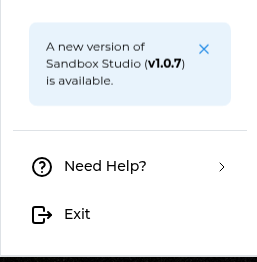
Important: Only Major and Minor version updates will trigger this notification. Patch updates will not generate automatic notifications in the left menu.
Administrators have the option to dismiss these update notifications if they choose to postpone the update. Only new major/minor updates will trigger another notification.
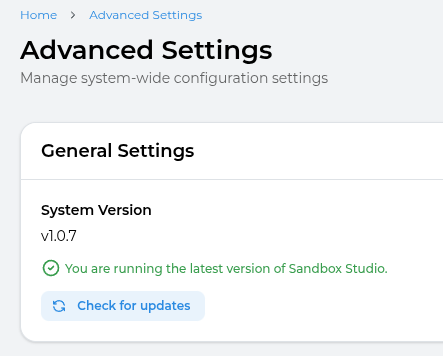
Manual Update Check
For administrators who want more control or need to check for patch updates, a manual check option is available:
This manual check provides visibility into all version types and allows administrators to stay completely up-to-date, even with the smaller patch releases that don't trigger automatic notifications.
Understanding Version Numbers
Software versions follow a three-part numbering system: Major.Minor.Patch (for example, 2.5.3)
- Major versions (e.g., 1.0.0 → 2.0.0) - Significant updates that may include substantial new features, architectural changes, or breaking changes that could affect existing functionality. These are the most important updates to review.
- Minor versions (e.g., 2.1.0 → 2.2.0) - Moderate updates that typically add new features or improvements while maintaining backward compatibility. These enhance the software without disrupting existing workflows.
- Patch versions (e.g., 2.1.1 → 2.1.2) - Small updates focused on bug fixes, security patches, and minor improvements. These are routine maintenance updates.